
Radviz#
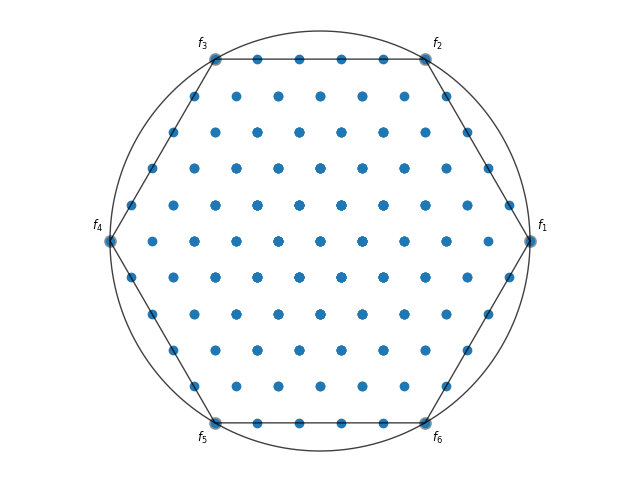
Radviz maps a higher-dimensional space with a non-linear function to two dimensions. Let us visualize some test data:
[1]:
from pymoo.util.ref_dirs import get_reference_directions
from pymoo.problems import get_problem


ref_dirs = get_reference_directions("uniform", 6, n_partitions=5)
F = get_problem("dtlz1").pareto_front(ref_dirs)
A simple Radviz plot with points can be created by:
[2]:
from pymoo.visualization.radviz import Radviz
Radviz().add(F).show()
[2]:
<pymoo.visualization.radviz.Radviz at 0x7bf368196fd0>
The plot can be further customized by supplying a title, labels, and by using the plotting directives from matplotlib.
[3]:
plot = Radviz(title="Optimization",
              legend=(True, {'loc': "upper left", 'bbox_to_anchor': (-0.1, 1.08, 0, 0)}),
              labels=["profit", "cost", "sustainability", "environment", "satisfaction", "time"],
              endpoint_style={"s": 70, "color": "green"})
plot.set_axis_style(color="black", alpha=1.0)
plot.add(F, color="grey", s=20)
plot.add(F[65], color="red", s=70, label="Solution A")
plot.add(F[72], color="blue", s=70, label="Solution B")
plot.show()
[3]:
<pymoo.visualization.radviz.Radviz at 0x7bf365d63850>
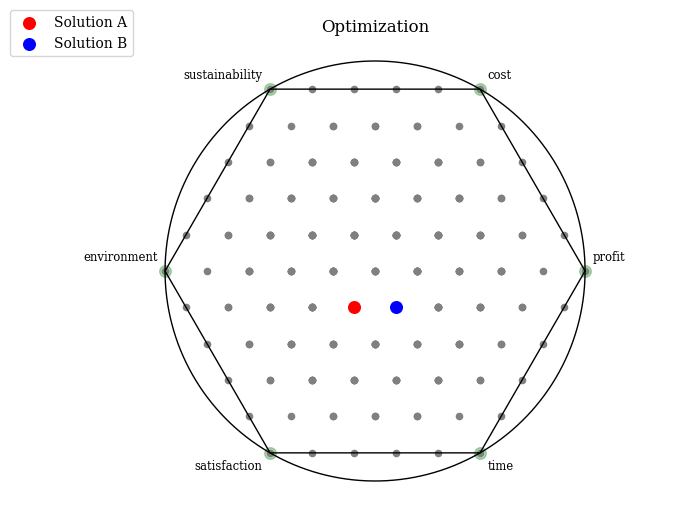
Note that radviz plots are by default normalized.
API#
- class pymoo.visualization.radviz.Radviz(endpoint_style: dict | None = None, **kwargs)[source]
Radviz plot visualization.
- Parameters:
axis_style – {axis_style}
endpoint_style – Endpoints are drawn at each extreme point of an objective. This style can be modified.
labels – {labels}
figsize – {figsize}
title – {title}
legend – {legend}
tight_layout – {tight_layout}
cmap – {cmap}